
The ROI Calculator uses a predictive algorithm to calculate the cost benefits of reducing psychosocial hazard exposure. If your risk assessment included the default "recommended" items, the ROI Calculator will be available in your dashboard.
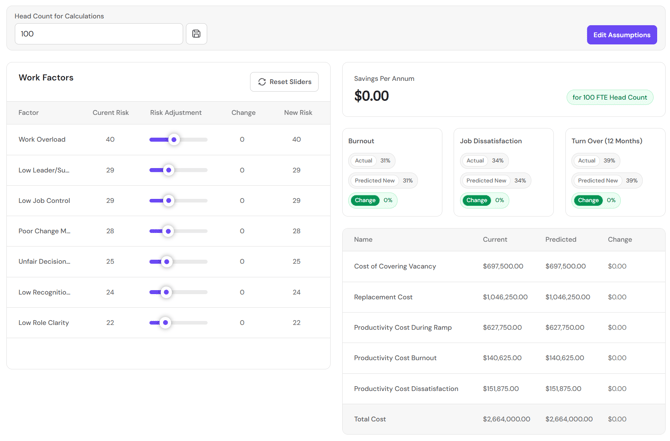
The Current Risk score for each Factor is populated from the Total Exposure score in the Work Factors tab. The Calculator defaults to your global survey results. To target a specific group, apply the filter in the top section of the dashboard.
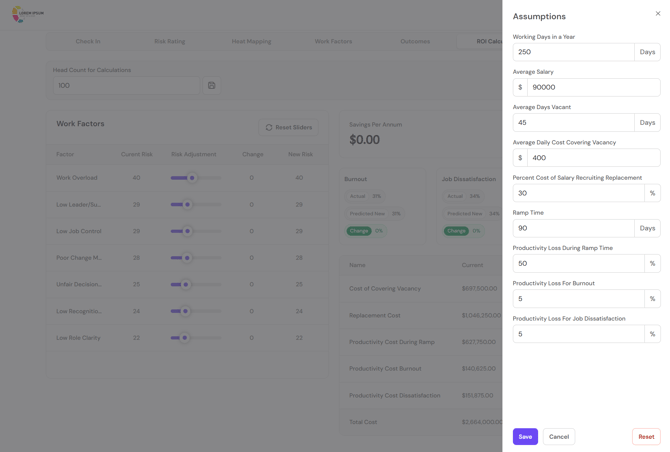
Enter the head count that you want to use for your calculations, for example, the total number of employees within the group in question. Next, go to Edit Assumptions. Here you can populate the values to be used in the calculations, to ensure they are correct for your organisation, or for the group in question. Click the Save button before you exit.
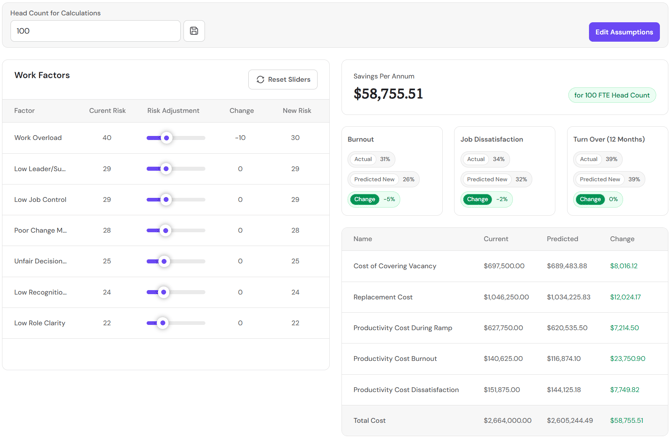
Now you are ready to calculate ROI. Identify the hazard/s you intend to target, and use the Risk Adjustment slider to enter your reduction target (e.g. reduce Work Overload by 10 points). The Savings Per Annum figure will calculate the expected savings to the business per year associated with this reduction, with the detailed line items on the source of the cost savings in the tables beneath.
Return to How do I interpret my FlourishDx work factors risk assessment results?
Up Next: How do I interpret my FlourishDx work factors risk assessment Demographics tab?